Here's what someone did in maya.

To see the subsurface scattering in effect, I placed two spotlights, one at the back and one at the front of the bunch of grapes. It took me quite some time to get the look right as this is my first time doing subsurface scattering. But in the end, this result satisfied me for the time being. Here's the shading network:

Note to self:
His maya network consist of a base color and 3 different noises:
Brownian
Stucco
AAnoise(i suppose)
Essentials:
SSS
Spot Lights
Also, I have downloaded some grapes for this shader assignment.

Will work on the composition of the grapes too.
Also found a tutorial of the making of grape, from modeling in maya to the shading in Blender.
This was the end result.
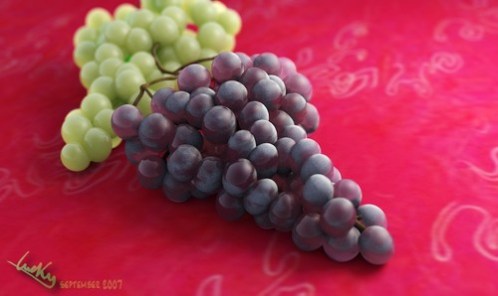
I observed some real grapes and searched for photos with google. I’ve found out there are two main shaders that could do the trick:
A reflective shader, with SSS, because when you put a light behind grapes you can easily see the light going through and it turns the grapes into a red color. The Fresnel effect is valuable on such a reflective shader, i set it to a high value (2.2) to be more realistic. And on top of that, a dust shader, without reflections nor specular to make the grapes soft and dusty.
A reflective shader, with SSS, because when you put a light behind grapes you can easily see the light going through and it turns the grapes into a red color. The Fresnel effect is valuable on such a reflective shader, i set it to a high value (2.2) to be more realistic. And on top of that, a dust shader, without reflections nor specular to make the grapes soft and dusty.
Reflective shader:

Blurry reflections (if Glossiness < 1) would even be better, but is slower to render.
Dust shader:

The dust shader is made with two clouds textures.
First texture channel: Cloud. Noise Depth = 6. It looks like this:
First texture channel: Cloud. Noise Depth = 6. It looks like this:

Nor is activated for bump mapping and Alpha to leave transparent spaces (where pixels are black) so that the reflective shader is visible under this one. Consenquently, Alpha value of this material = 0.

Second texture channel: stucci to simulate the dust noise.

Ramps are useful to enhance the dusty effect, thanks to the ‘normal’ input (useful to create silky material and micro-hair, like apricot, peach skin, etc…):

I connected the 2 materials with the nodes (a simple “mix” node did the trick):

The lighting isn’t complicated, one area light on the right side of the picture (with ten samples to have smooth shadows), plus plain Ambient Occlusion (13 samples). Yes, it was not too long to setup!
Blurry Reflection
Its dust material is made up of two cloud textures. T.T
Ramp to enhance dusty effect.
SSS TIPS:
Some dude did this in maya...
http://vimeo.com/8015512